
ZuploZuplo
LoginSign Up
  • Documentation
  • API Reference
Introduction
Getting Started
    Develop using the Portal
      1 - Setup Your Gateway2 - Rate Limiting3 - API Key Auth4 - Deploy5 - Dynamic Rate LimitingMCP - Quick start
    Develop Locally
      1 - Setup Your Gateway2 - Rate Limiting3 - API Key Auth
Concepts
Development
    CORSEnvironment VariablesBranch-Based DeploymentsTestingTroubleshootingGitOps vs TerraformCustom Code
    Local Development
    Guides
      Advanced Path MatchingAPI VersioningOpenAPI Server URLsConvert URLs to OpenAPIOpenAPI Extension DataPath Modification ScriptsOpenAPI OverlaysCanary Routing for EmployeesGeolocation Backend RoutingUser-Based Backend RoutingBypass a PolicyTesting GraphQL QueriesHealth ChecksPerformance TestingTroubleshooting Slow ResponsesNon-Standard PortsHandling FormDataS3 Signed URL UploadsCheck IP AddressLazy Load ConfigurationSharing Code Across ProjectsBackstage IntegrationGitHub Action Automation
Policies
Handlers
API Keys
MCP Server
MCP Gateway
AI Gateway
Developer Portal
Monetization
Deploying & Source Control
Observability
Networking & Infrastructure
Account Management
Programming API
Build with AI
Zuplo CLI
Migration Guides
Platform LimitsSecuritySupportTrust & ComplianceChangelog
powered by Zudoku
Guides

Bypass a Policy for Testing

There are times when you need to bypass a policy for purposes such as testing, debugging, writing health checks, etc. This guide will show you a few ways to bypass a policy.

Bypass a Policy Using a Test API Key

If you are using Zuplo API Key Authentication and want to create a test API Key that can bypass a policy, you can quickly do so by using the API Key metadata and a custom policy.

Step 1: Create a Custom Policy

The Custom Code Inbound Policy is essentially a wrapper around whatever policy you want to bypass. In this example, we will create a custom policy that bypasses the monetization-inbound policy.

This policy first checks for the presence of a testApiKey flag in the user's data (which is the API Key metadata). If the flag is present, the policy returns the request as is. Otherwise, it invokes the monetization-inbound policy using the invokeInboundPolicy method on the ZuploContext object.

Create the custom policy configuration in the policies.json file.

config/policies.json
{ "policies": [{ { "name": "monetization-with-bypass-inbound", "policyType": "custom-code-inbound", "handler": { "export": "default", "module": "$import(./modules/monetization-with-bypass)", "options": { "config1": "YOUR_VALUE", "config2": true } }, } }] }

Create a new module for the policy code.

modules/monetization-with-bypass.ts
import { ZuploContext, ZuploRequest } from "@zuplo/runtime"; export default async function policy( request: ZuploRequest, context: ZuploContext, ) { if (request.user.data.testApiKey === true) { context.log.info("Bypassing monetization-inbound policy for testing."); return request; } return context.invokeInboundPolicy("monetization-inbound", request); }

Step 2: Replace the Monetization Policy with the Custom Policy

Wherever you use the monetization-inbound policy, replace it with the custom the custom policy.

config/routes.oas.json
"x-zuplo-route": { "corsPolicy": "none", "handler": { "export": "default", "module": "$import(./modules/todos-and-users)", "options": {} }, "policies": { "inbound": ["monetization-with-bypass-inbound"] } }

Step 3: Create a Test API Key

To create a test API Key, navigate to Services in your Zuplo Project. Select the API Key Bucket you want to use and click Create Consumer. Enter a name for the consumer. Set the metadata to include the testApiKey flag as shown below.
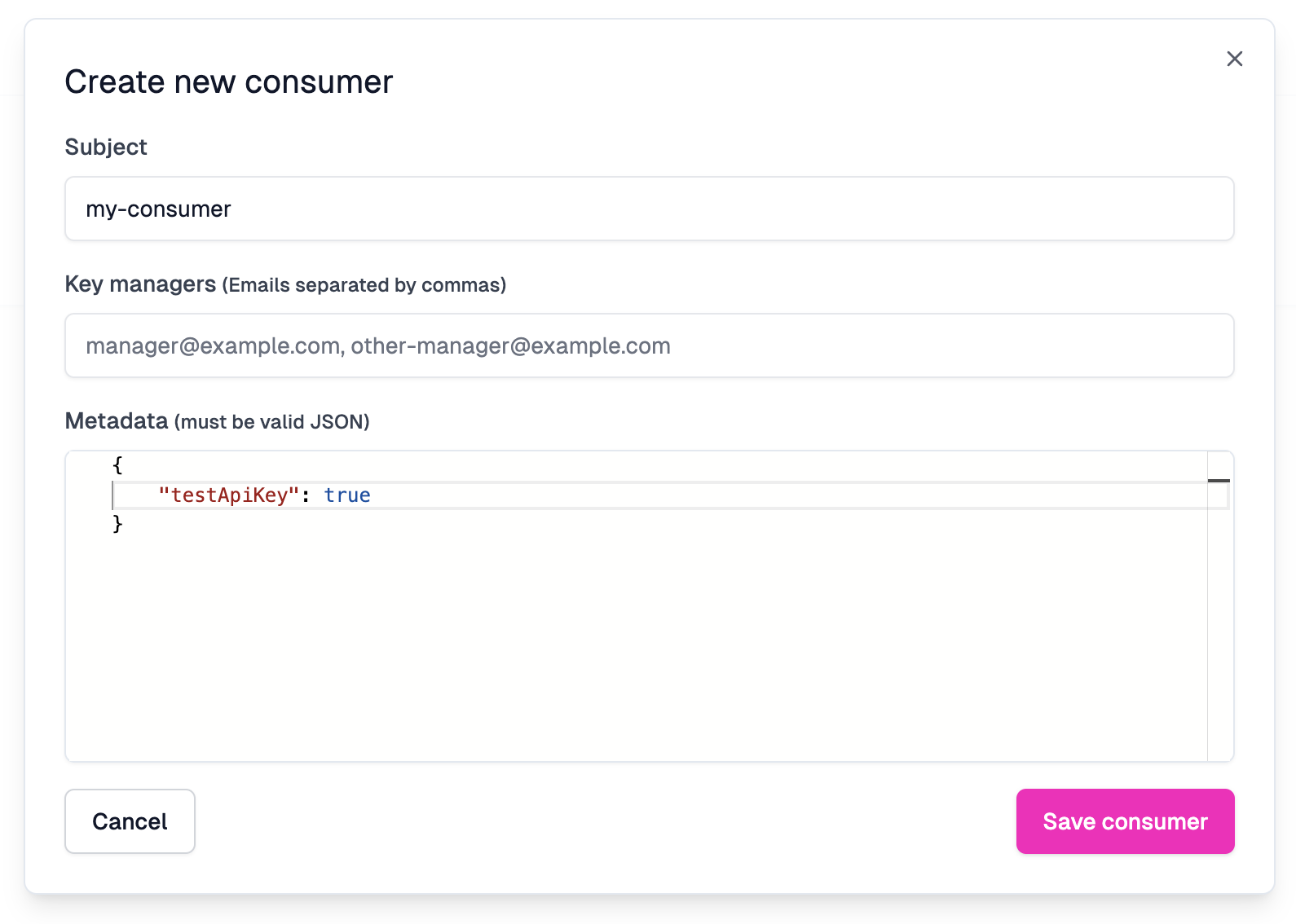
Test API Key

Now when you call the API with the test API Key, the monetization-inbound policy will be bypassed.

Use a JWT Token Claim

In the above example, we used the API Key metadata to bypass the policy. However, if you are using JWT authentication, you can follow the same principle by adding a custom claim to the JWT token. Many providers, like Auth0, allow you to add custom claims to the JWT token.

The claims for a JWT token are added to the request.user.data object when you use one of the Zuplo JWT Authentication policies. So you can use the same code as the previous API Token example, by adding a custom testApiKey claim to the JWT token.

Edit this page
Last modified on November 17, 2025
User-Based Backend RoutingTesting GraphQL Queries
On this page
  • Bypass a Policy Using a Test API Key
    • Step 1: Create a Custom Policy
    • Step 2: Replace the Monetization Policy with the Custom Policy
    • Step 3: Create a Test API Key
  • Use a JWT Token Claim
JSON
TypeScript
JSON